I've been using Win 8 for a few months now. It's been mostly fine. Frustrated at times, yes. Missing things, yes! Craving the start button, Yes!!
Well no more craving. I've loaded up the new Windows 8.1 Preview and like that the Start Button is now present.
But I didn't like that it just goes to the Start Tile Screen instead of the traditional Windows 7 window. I suppose Microsoft will hear complaints about how the new button behaves. I'll be waiting to see what people end up thinking about it. Does is really fix the outcry or just amateurishly appease the complainers that wanted it back?
Showing posts with label tech talk. Show all posts
Friday, June 28, 2013
Wednesday, June 12, 2013
Fixing missing Dell D620 wireless wifi drivers with Ubuntu
I have an old Dell D620 that I use as a sofa surfing laptop. I've found Ubuntu works great for this purpose. I've freshly installed Ubuntu on it a few times and always have a problem with the wireless drivers not installing correctly. To fix this run these two commands from terminal:
sudo apt-get purge bcmwl-kernel-source broadcom-sta-common broadcom-sta-source (it may not see all of these)
sudo apt-get install b43-fwcutter firmware-b43-installer
Restart and wifi will be good.
sudo apt-get purge bcmwl-kernel-source broadcom-sta-common broadcom-sta-source (it may not see all of these)
sudo apt-get install b43-fwcutter firmware-b43-installer
Restart and wifi will be good.
Tuesday, June 11, 2013
Made in America Mac Pro by Apple
I love that Apple is continuing to support US manufacturing, albeit very minimally but hey gotta start somewhere. Their new Mac Pro is quite a different take on a server. It is adding excitement by bucking two trends: manufactured offshore and tradition enclosure. Yes, in a very Apple-like way the new Mac Pro is moving rapidly away from the square corner box design. I love the look. I like the idea on cooling, can't wait to see more on the fan. Sure I've already seen comments about having to fit these into the workplace, rackplace. But the footprint is tiny, and I'm sure simple solutions will be created.
Can't wait to see more highlights on the product. And so great that it is Made in USA. Fantastic that the entire line of Mac Pros will be US Made. So design firms overseas will have to import these US Made computers. iAwesome.
Thursday, May 23, 2013
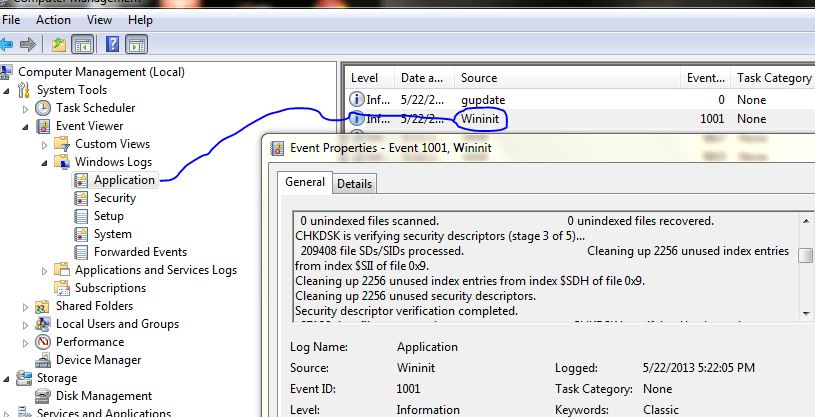
Finding CHKDSK log in Windows 7
-Open Computer Management
-Expand System Tools > Event Viewer > Windows Logs
-Look in the Application log for Wininit in the source column
-Double click that entry and you'll see all the results of the CHKDSK
Click photo to see larger version:
Friday, March 22, 2013
How to disable the password expiration on Windows Server 2008
If your server is non-domain joined and you are not using Active Directory the Local Security Policy controls items like password complexity rules, account lockouts, and
password expiration. To turn off password expiration you'll need admin rights and to simply edit the Local Security Policy:
- Launch “Local Security Policy”: Start > Administrative Tools > Local Security Policy
- Expand “Account Policies” and select Password Policy
- Set the Maximum Password age to “0″
Friday, March 15, 2013
Microsoft Exchange Server - Using PowerShell to Share Outlook Calendar
On occasion I need to manage Exchange mailboxes. Generally I
just do two simple tasks: Send As and Calendar permissions. The former can be
easily managed via EMC, the latter cannot. While it can be managed from the sharing
calendar user’s Outlook client, that is annoying and can require human interaction. Let's keep that kind of stuff to a minimum. It’s much easier to user PowerShell. Be
sure to use the Exchange Powershell Module.
You can look at a user’s permissions with this cmdlet:
Get-MailboxFolderPermission
After entering the cmdlet you type in a user mailbox for
Identity. You can also add the –Identity into the cmdlet directly to define. Either way, this will display the current permissions for that user.
To give a user to have permissions to another calendar use this cmdlet:
Add-MailboxFolderPermission -Identity TheUserCalendarYouWantToShare@somemail.com:\Calendar -User GivingRightsToThisUser@somemail.com -AccessRights
Reviewer
Adjust the AccessRights as needed, ie: Owner, Editor,
Author, Reviewer, etc…
Tuesday, February 19, 2013
Make Google Chrome download PDF files by default
If you prefer for Chrome to download PDFs and not use the
preview view mode you need to disable the PDF viewer plugins.
In the Chrome URL address bar type:
Look for and disable Chrome PDF Viewer
You may also need to disable any Adobe Reader plugin.
Close and restart Chrome and now PDFs will be downloaded.
...
...
Tuesday, January 22, 2013
Cheap case for Samsung Galaxy Tab 2 7.0 Android Tablet
I've been enjoying the Galaxy Tab 2. I take it to and from work each day and wanted a cheap cover to protect it when throwing it into my bag. I picked up a cheap checkbook style case for it from Amazon. Under $10 ought to do the job just fine. Totally imported from China and fake leather galore.
It does have the tab for the standing mode which I don't use often. But this is nice for watching movies when flying. It has the appropriate cut-outs in all the needed places.
You can check out cases for the Galaxy Tab 2 7.0 at Amazon here.
It does have the tab for the standing mode which I don't use often. But this is nice for watching movies when flying. It has the appropriate cut-outs in all the needed places.
You can check out cases for the Galaxy Tab 2 7.0 at Amazon here.
Friday, December 28, 2012
New tech device - Samsung Galaxy Tab 2 7.0 Android Tablet
Just picked up a little tech friend: Samsung Galaxy Tab 2 7.0 tablet. Overall a great deal for under $200.
The big selling point for this is for a traveling tech device. When we travel with the kids we generally bring our iPad. And usually an iPod touch. So this 7" tablet squarely sits in the middle of these two other video content showing devices.
With a ton of Android tablets available I easily decided on this one. Here is why:
The big selling point for this is for a traveling tech device. When we travel with the kids we generally bring our iPad. And usually an iPod touch. So this 7" tablet squarely sits in the middle of these two other video content showing devices.
With a ton of Android tablets available I easily decided on this one. Here is why:
- Major brand - I know there are a ton of cheaper knock-offs but I trust Samsung @ under $200 than some unknown @ under $100.
- SD Card slot - It is expandable with microSD card slot. And I already had a 2 GB card in a drawer collecting dust.
- Cameras - Front and rear cameras. Second front camera will allow video chatting when travelling.
My only big negative: Samsung proprietary USB charger cable. Hate this. Wish it just had standard micro USB port. Oh well... But would have been nice to travel with one cable to charge my phone and the tablet.
Now I get to play with the Tab 2 for next few days to learn this version of Android OS. You can check out the Samsung Tab 2 7.0 at Amazon here.
Wednesday, December 05, 2012
Removing Comments Form from Wordpress Photo Attachments
I just figured out a stupid Wordpress problem that has been
bugging me for a while. (I’m using version 3.2.) I’m not a programmer or coder
at any level so it feels good to figure this out on my own.
The problem was Wordpress was showing the comment form with
attachments. The Discussion settings that let you close comments after so many
days applies to Post only, and not attachments. I knew that I could tweek the
PHP code to solve this.
I checked the attachment.php file and saw that this
referenced loop-attachment.php so I checked that for the code that was adding
the comment form. Near the bottom of the page I saw what I thought was the
offending code ((Blogger strips out the PHP tags so I'm alerting the brackets here ( = < .... )):
(?php comments_template(); ?)
But commenting this out didn’t remove the form from
attachment pages. I checked functions.php and didn’t see anything there. So I
started to use simple echo statement to see what file would be adding the text
to my pages.
This showed lead me to single.php and near the bottom was
the same code I was looking for:
(?php comments_template(
'', true ); ?)
I knew I couldn’t remove this completely since it would
remove the comment form from Post that I wanted it on. I knew a simple If Else
statement could solve this. So using if_attachment I replaced
(?php comments_template( '', true ); ?) with my If Else statement:
(?php if (is_attachment())
{
echo "Comments
Closed";
}
else
{ comments_template(
'', true );
}
?)
I added the echo but you could leave this out if you wanted.
In the end this probably isn’t the most elegant solution but works for me!

Subscribe to:
Posts (Atom)